LINK TO FULL ISSUE of Mobile Media Monthly
distributed
Source: What’s New at BrainPOP?
Students Represent STL at Student Technology Showcase at State Capitol
I was proud to be part of the Pennsylvania Association for Educational Communications and Technology (PAECT) Student Showcase at the state Capitol Building in May with four outstanding eighth grade students, Emmy Ploskina, Alexis Riske, Lucas Meinert, and Luke Manion who represented St. Louise de Marillac Catholic School. They joined students from over 50 schools across the state to share technology used in schools. Students, teachers, parents, legislators, and the public learned about different technology used in classrooms by students of all ages. Our students had the opportunity to interview Brandon Lutz, President of PAECT, (sponsor of the showcase), Stephanie Moon, PAECT Showcase Coordinator, students from other schools, as well as our State Senator, Guy Reschenthaler, who stopped to visit with the students to commend them for their work with video production and interactive media. Students were featured on a livestream from the Capitol featuring the tools they shared.
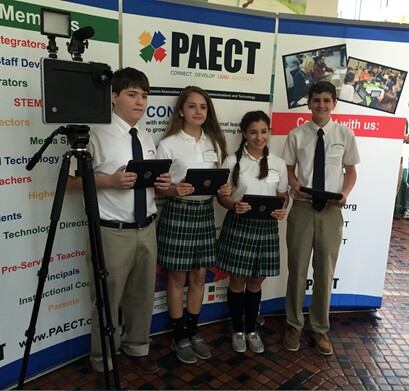
The archived recording from all student presentations can be found here: http://video.paiunet.org The clip of just the STL students can be viewed here: https://vimeo.com/171182191
Below is a short promo of their presentation created with TouchCast (one of the featured tools) with an invitation to visit the exhibit table. It includes direct links to the tools that were featured iusing an example of HOT SPOTS in a TouchCast. If embedded link doesn not work, go to: http://www.touchcast.com/magistrazee/example_of_hot_spot_on_a_video_clip_in_touchcast
//www.touchcast.com/embed/171997
Yesterday was the first full day of Summer Vacation. I am always looking for new technology to try, but for my first day of Summer Tech Exploration, I tried a ONLINE MEAL SUBSCRIPTION SERVICE – Hello Fresh.
GOOD NEWS: Delicious and Fresh
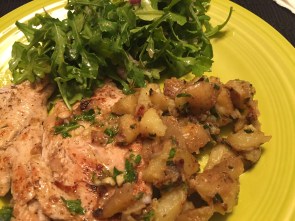 The good news is the food was delicious, the recipes were clear, and yes, they did arrive “fresh.” The presentation was great and the items were nicely packaged. The fresh items are packaged on the top of the box and there are frozen plastic “gel” packs underneath and the meat items are shipped under those. All items arrive chilled and fresh. You also get a “Hello Perks” envelope of “offers” for different subscription services to try at a discount. The service lets you know that you do need to use your own salt, pepper, and olive oil (pantry items), but that was not a problem at all.
The food prep and cooking time took longer than the recipe card estimated, but it was fun. I would guess that now that I have the hang of what is involved it will run smoother in the future. Check out the Vine here: https://vine.co/v/iYQ0hJjH5vx


BAD NEWS: Packaging and Clean up
The bad news is the shipping box which arrived earlier in the week and was bigger and heavier than I expected it to be and there was a lot of packaging. I did think there was a LOT of packaging. We do recycle cardboard and plastic, but I wondered about the ice packs. This first shipment had 4 in it. The website says, “Reuse these non-toxic ice packs for a picnic or camping. You can also recycle the plastic pouch and discard the contents with your household trash, worry free.” I could see saving and reusing a couple for picnics but after a few shipments, I would have too many of them. So, it looks like, I will have to empty the contents in the trash and recycle only the plastic bags.


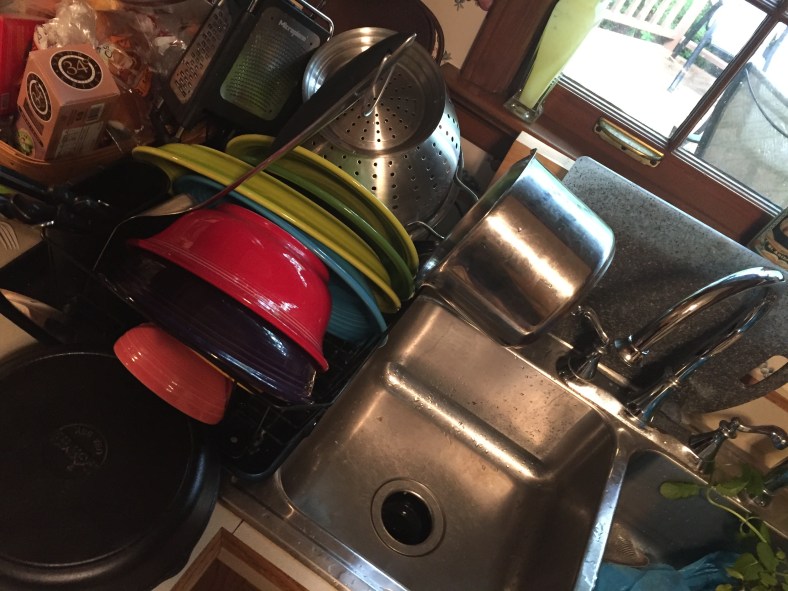
The other issue is clean up. I did hand wash all the dishes and utensils and snapped a photo. You could use a dishwasher and save some time, but you still need to clean up your counter work. Aside from the prep and clean up which is an issue with any in-home cooking, the experience was wonderful. Since school is out, I figured, summer was a great time to start this service, and I could devote some time to cooking and cleaning up! And I am hoping it will help me to eat better! I am planning to try the service for a while and see how it goes.
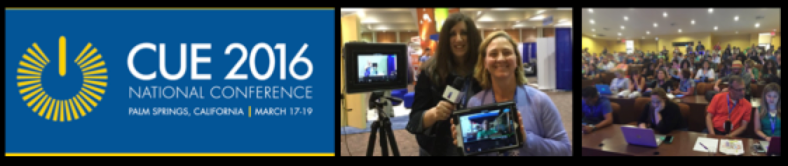 Last week, I attended and presented at CUE 2016 a national technology conference held in beautiful Palm Springs, California. Here is a post conference wrap up using Blab with Bill Selak from CUE. More information coming. Click this link to view and listen to the BLAB: https://blab.im/6a70255643cf47a392b5cd5519a7eab6

Here are some interviews in the lobby at CUE: Click on the image below to view on TouchCast.

Here is an TouchCast with Hadi Partovi of Code.org

Interview with Mike Lawrence, CEO of CUE
http://www.touchcast.com/stl_lab/advice_from_mike_lawrence_cue_ceo/?ref=stl_lab&p=channel
Last year, I was named a TouchCast Ambassador and earlier this year, I was named a TouchCast STAR Ambassador. Here is the big announcement which introduces the new TouchCast Ambassador group for this year. These educators from around the world have had great experiences using TouchCast and you can get inspiration for your own projects by watching their TouchCasts. Don’t miss the TouchCasts by Kendra Grant and Luiz Perez and learn about UDL. Not sure what UDL is? Watch their TouchCasts and find out! I met both of them in person last year at ISTE and they share a wealth of knowledge.

http://www.touchcast.com/ambassadors/2016_touchcast_ambassador_announcement_
In addition, I was proud, honored, and delighted to be asked to write one of the chapters in the newest edition of the TouchCast Educator Guide, Engaging With the YouTube Generation. The guide is filled with practical tips, complete details on how to use TouchCast in your classroom and includes chapters written by TouchCast Teacher Ambassadors on how TouchCast can be used across the curriculum.
Check it out! TouchCast Educator Guide – http://guide.touchcast.com/youtube-generation/

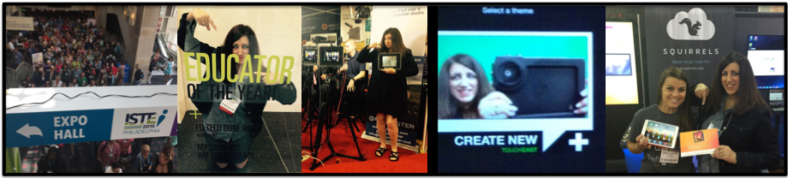
Remembering ISTE 2015: Crowds, fun, hanging out with my #KTIfamily and my friends at the Padcaster, TouchCastEdu, and Squirrels. Presenting TouchCast as an official TouchCast Ambassador was great and helping in the Digital Playground was awesome. I was happy to have the opportunity to attend the BrainPOP training session and in the fall completed the work to become an official BrainPOP Educator. Using Reflector from Air Squirrels also motivated me to become an Alpha Squirrel. If you have never attended ISTE, you definitely need to add it to your TECHNOLOGY Conference Bucket List! There is so much energy and people are very willing to share.
Check out my TouchCast about the event:http://www.touchcast.com/stlnn/iste2015_copy/?ref=stlnn&p=channel

Meeting people from around the country and the world and learning how they are using technology to enhance learning is an amazing experience and will totally expand your PLN! I will miss ISTE this year, since I will be going to Austin TX for the American Classical League Summer Institute and presenting two separate sessions. (Last year I left the ACL conference early and went to ISTE, but this year, I can’t do that.) I will be one of those #NotAtISTE folks, so please TWEET and share what’s going on to keep us in the loop. This year ISTE is in Denver, CO. For more information, go to the ISTE website here: https://conference.iste.org/2016/

PETE&C is the Pennsylvania Educational Technology Expo and Conference held in Hershey, PA every year. Teachers, administrators, and vendors gather from across the state and beyond for concurrent sessions, networking opportunities, to hear amazing keynote presenters, and to check out the latest technology available for teachers to enhance their students learning. I had the opportunity to present my favorite app TouchCast. I just love sharing this great app for media creation and am always surprised to hear how many people are just learning about it for the first time. TouchCast is interactive media for the web. It allows students and teachers to become creators of technology and not just the consumers of technology. This is a complete interactive video studio in the form of a FREE app for teachers. You can insert lower thirds, interactive whiteboards, polls, questions, annotate information, insert maps, live twitter feeds, add special video filters, green screen effects, sound effects and more. It is perfect for cross curricular activities and the students love it.

https://touchcast.com/stl_lab/touchcast_pete2016
I also shared information about TouchCast’s Studio in a Box which is a great deal and a good way to start up your classroom media studio. Check out Studio in a Box. For the next step up, or if you are looking for more professional equipment, check out Padcaster. Padcaster equipment is study, durable, and gives you the ability to expand your program and make your studio mobile. Another great tool that I used during my presentation was Reflector. Reflector allows you to mirror your iPad without being wired to your device. They have other fantastic apps and tools for teachers.I also served as a PETE&C Lead volunteer again. Serving as a volunteer is a great way to experience the conference and get a behind the scenes look at what’s happening.You can apply to be a volunteer by going to the PETE&C website each year.
This year the weather was great and visiting Hershey, PA is always a “sweet” experience.

This year’s TRETC Conference was held at Bethel Park High School on November 3rd and 4th. I shared TouchCast at a pre-conference session and a regular session and invited former students to assist with The Red Chair sitwithme.org project.
I always enjoy sharing TouchCast and all of its features and NEW features. Having a pre-conference session allowed for attendees to have more time to really explore this FREE interactive media app. See TouchCast.com for more info and read my earlier posts. My regular session was also lots of fun and I loved having former students there to help.
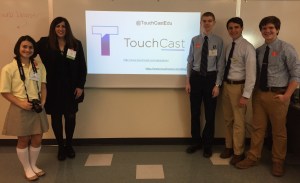
One of the highlights at TRETC for me was hosting the Red Chair again. This was the second time that the Red Chair was at the Three Rivers Educational Technology Conference TRETC, but there was no shortage of educators who were happy to “sit to take a stand” for women in ED TECH. Teachers, vendors, consultants, and administrators wrote their thoughts, shared a hashtag or held a photo frame in front of a green screen where they could choose their choice of a tech related background. My former Student Tech Team members who are now High School students continuing their interests in Technology worked to help raise awareness for women in tech.. Sarah Scalise of Seton La Salle Catholic, Tom Wildenhain of Central Catholic, Christian Romano of Central Catholic, and Greydon Tomkowitz of Bethel Park High School (the host school) did an outstanding job promoting the RED CHAIR and documenting the event.

Keynote speaker, Mandela Schumacher-Hodge, former public school teacher, education policy researcher, PhD candidate, and Founder of The Startup Couch was one of many attendees who happily sat in the Red Chair. When asked if she would like to sit in the RED CHAIR, Mandela gave an enthusiastic, “Yes!” Mandela thoughtfully wrote the following on the sign she held for her photo in the Red Chair, “I am diverse and I am an asset #WomenForTech @MandelaSH.” We were inspired by her keynote presentation at the conference and honored that she took the time to sit in the Red Chair for the sitwithme project. You can see Mandela’s photo, the display, and the all those who joined the fun as they sat in the RED Chair at the Conference.
Red Chair at TRETC 2015 – Teachers at Region Ed Tech Conference sit in the Red Chair to support awareness for Careers in Tech for women. http://get-puppet.com/v/_SK6vFg5nzU?autoplay=true
Album of photos https://goo.gl/photos/nZNUpsL8hLT11tHq8
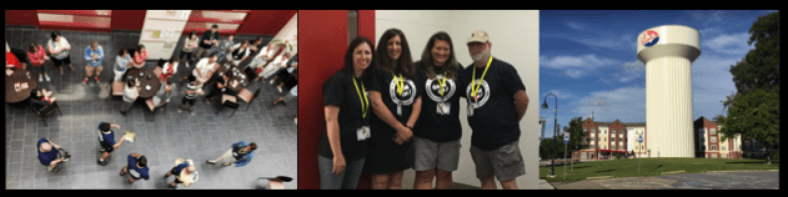
I was honored to be named a Keystone Technology Innovator in 2014. This year, I returned to the summit as one of the Lead Learners and it was a great experience. I enjoyed meeting, sharing, and learning with the KTI 2015 Class. http://keystonespa.org/ I was in charge of coordinating the STEAM playground for the summit and we had a RAILROAD theme for it.It gave the attendees a chance to check out Sphero, Arts &Bots, Finch Robot, Osmo, some coding Apps, and more. One of my presentations was on Digital Citizenship. And I also had the opportunity to share my favorite App – TouchCast. A group of KTIs wanted to spend more time using the app, so we made this TouchCast. http://www.touchcast.com/magistrazee/kti_learning_forecast/?ref=magistrazee&p=channel
Here are some other TouchCasts from the Summit:
KTI Class of 2015 Sharing at a Reverse 60 in 60:
http://www.touchcast.com/magistrazee/a_peek_at_the_kti_summit_2015/?ref=mychannel
Digital Citizenship Session
http://www.touchcast.com/magistrazee/kti_digital_citizenship_session/?ref=mychannel
Clip from TouchCast Session – Inviting everyone to follow KTI on Twitter. We are currently using #ktifamily to stay connected and we have monthly twitter chats.
http://www.touchcast.com/magistrazee/kti/?ref=mychannel
Build a Tower out of Spaghetti and Marchmallows:
http://www.touchcast.com/magistrazee/building_towers/?ref=mychannel
Good luck to the new KTI Class of 2016. You will love being a KTI and expanding your personal learning network with your new KTI Family.
 zeepoerio