Month August 2019
My 23rd First Day as a Teacher-New Challenges and Goals
It’s hard to believe that I have been teaching for 22 years and today was my 23rd first day of school as a teacher. It’s always exciting to start a new school year but it sure is tiring at the end of that first day! I am looking forward to a great year in the STREAM lab and I one of my goals for this year is to add more “E” for engineering activities. I jumped right in with that today. It was interesting to see how the students would react to doing “unplugged” activities in the space we still call the “computer lab.”
In the past, there were times I lead unplugged or NON screen activities in the “STREAM Lab” and there were actually younger students who were so disappointed that they “didn’t get to use the computers” that day that they shed some tears! Also, I understand the need to have a balance with screen time want the students to see that we can still learn in the STREAM Lab without screens sometimes. I am probably more guilty than a lot of my students for how much time I spend on computers or looking at screens. I am the computer teacher after all, but I do all of my work on the computer or take photos with my phone, record and edit videos, read blogs, articles, books, participate in webinars and online meetings as a way to learn something new everyday. But I do understand the need for spending time with family, friends, and others face to face and being involved in other activities. ( I do like to walk and shop, so I do get out of the house and away from my screens, but I know I could do better as my own family tells me I need to practice what I preach!) With that being said, I really love Screen Free Week . Mark your calendars and celebrate May 4-10, 2020 and learn more here: https://www.screenfree.org.
Back to our day trying some engineering challenges…
Check out KEVA planks! http://kevaplanks.com is a great website and it has fantastic resources for teachers. I ordered KEVAplanks for our STREAM Lab just by reading about them on their website (during my hours of screen time!) and never really saw them in advance, but they looked great, I loved the art, math, problem solving, collaborative aspect of the KEVAplanks and I really wanted something that would add that engineering component to the STREAM Lab. From what I could see on the site, KEVAplanks would be perfect! When they arrived, I couldn’t stop building with them myself. I loved the challenge cards and looking for different solutions to the problems presented. Plus, I could use these in my Latin/Classics course that I teach with 7th and 8th grade to build catapults, historical models of ancient building, columns, and more. I also found it was very relaxing to build with the Kevaplanks. I need to add Calm app in the background, and I’ll really have a nice activity going for everyone. (Check out https://twitter.com/calm and #Calmforschools on Twitter to add more mindfulness activities to your classroom. You can sign up for the Calm for Schools initiative and have access to the entire app.)
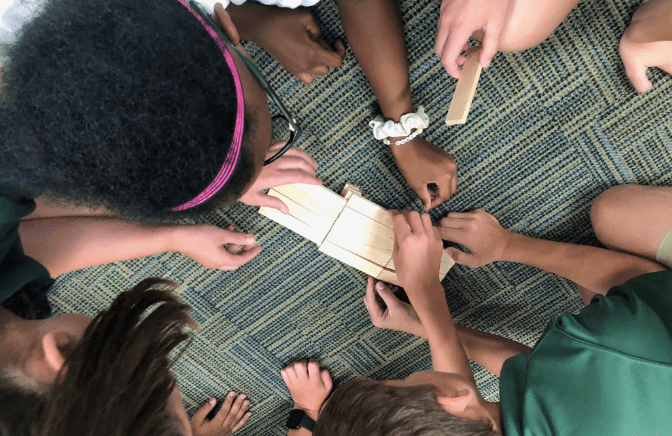
With the students today, I tried the KEVAplanks “Build a bridge” challenge using 20 KEVAplanks. I cut strips of blue felt to distribute for the students to use to represent the “river” or “water under the bridge”. The students tried lots of different techniques to build. I gave them NO introduction to using the planks and wanted to observe how they would approach the challenge. The first group laid a plank right on top of the water. I told them the plans couldn’t touch the water. Another group did a great job but the bridge planks weren’t flush across the top. So I had to tell them to image that a car had to drive over what they build. That also helped so they didn’t build “steps” up to the ramp of their bridges. It was interesting to watch how some of the students figured out that they could use the edges of the planks to help line up the edges and sides of the planks they were placing. this was a great first activity. The students wanted to do more, but I only see them for a 40 minute period, so the next challenge will have to wait until next week.

Be sure to follow @KEVAplanks on Twitter where they post wonderful challenges each week to try.
Our on screen activities will include classroom blogs, vlogs, and video projects to share. In addition to my teaching responsibilities, I also help trouble shoot tech issues in-house for the school and work with our technology support company as the liaison. With the 1:1 Chromebook program for grades 6 – 8 1 and new devices and video equipment added this year, I want to take advantage of our new infrastructure updating that was completed over the summer. I am happy to report we had no wifi or connectivity issues at all today and this was amazing. The investment was well worth it.
I am also looking forward to more collaborative work with my colleagues at school and beyond the walls of my school. I also want to share more on Twitter, get back to blogging, and continue participating in conferences and organizing PD sessions. I also want to have my students blog or vlog and I plan to share some of the tools we are trying. Stay tuned and thanks for reading! Let me know if you have questions. Please in the comments if you have used KEVAplanks and your favorite activities. I can’t wait to share more with you!
 zeepoerio